


Dispatched by Detrack
Issue 6

Plan the week, prove every email, invoice in Xero, and a first look at what's next

Dispatching

Calendar view just
got an upgrade

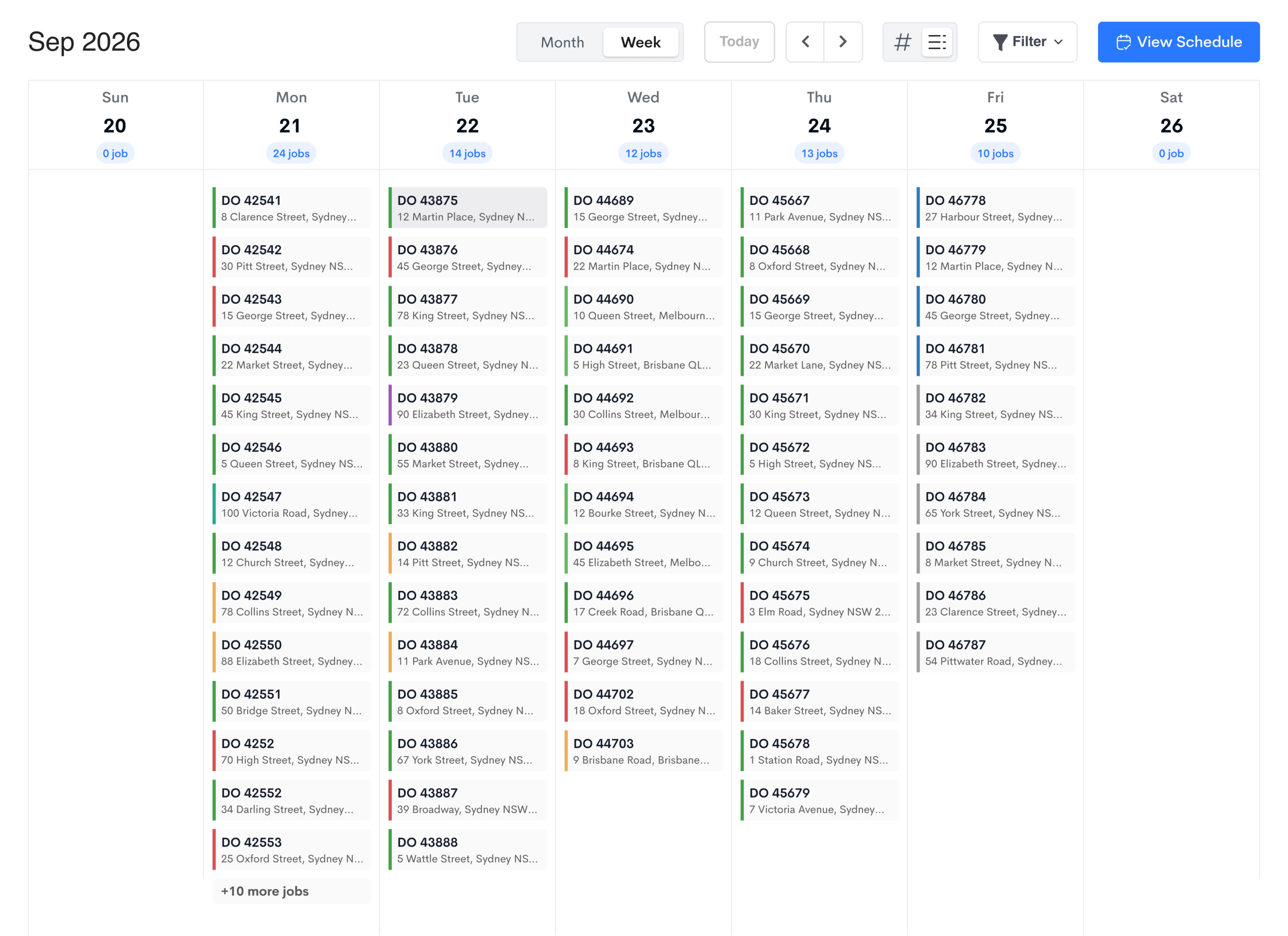
If your business runs on fixed appointments rather than optimised routes, this one is for you. You can now switch your calendar to a weekly view and see every job on each day, not just a count. It's one of the most common requests we've had from dispatchers since we launched this feature earlier in the year.

What's new

  • Toggle your calendar view between month and week
  • See every job for each day of the week in List View, including D.O. number and address
  • Filter the week by driver, group, run number or zone, and click any day to open its job list
Weekly calendar view in Detrack showing jobs listed under each day
Customer notifications

Email delivery reporting is here

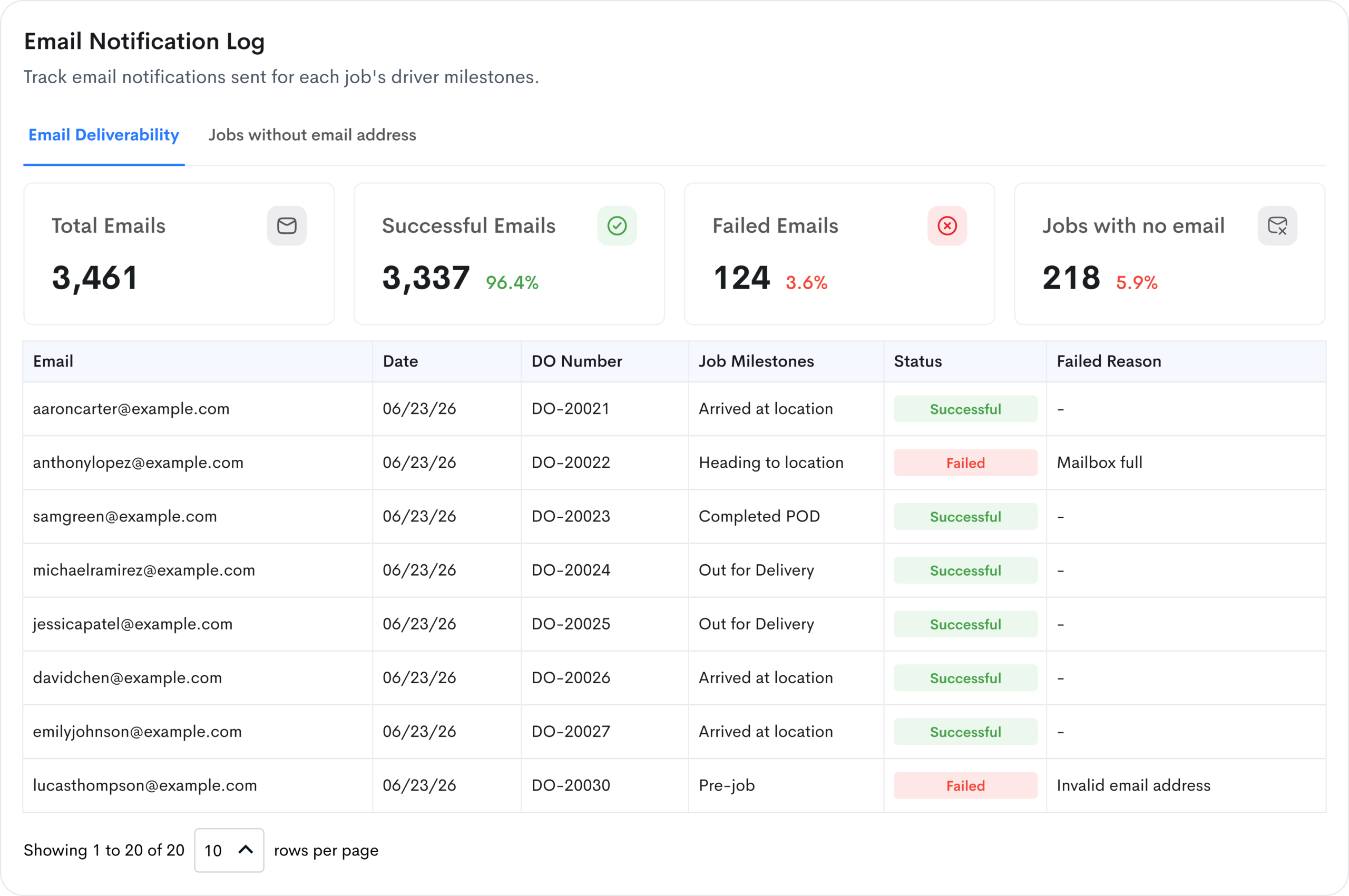
When you send email notifications to customers, you can now check whether each email was delivered, failed or is still pending. Many of you asked for this so you can resolve disputes faster when customers can't find their perfectly crafted, branded and automated email notifications.

Email notification log in Detrack showing successful, failed and pending emails

What's new

  • See the status of every job notification email: successful, failed or pending
  • See recipient email address, send date, D.O. number and milestone
  • Filter by date, milestone or status to track down a specific email
  • View status totals across any date range
  • Access the last 30 days of email logs in Detrack, and export them to CSV

💡 To turn this on, contact us via live chat or at support@detrack.com.

Integrations

Turn completed jobs into Xero invoices

You can now have completed jobs in Detrack created as invoices in Xero automatically, with their pricing included, so there's no manual data entry between the two platforms.

This new Detrack to Xero flow sits alongside our existing Xero to Detrack flow, where invoices in Xero create jobs in Detrack. They cover two different use cases, so you can run one at a time: choose the one that fits how your business bills.

What's new

  • Automatically create the invoice in Xero once the job is completed in Detrack
  • Invoice at job or item level, and include pricing from your Detrack Job Price field or Rate Card
  • Choose which job statuses are sent to Xero, so you decide how short or partially completed deliveries are billed
  • Control how invoices land in Xero: revenue account, currency, tax, payment terms, Draft or Approved and your D.O. number or Xero's
  • Match Detrack customers to Xero contacts, with missing contacts created automatically or flagged for manual review
AI

Ask your data anything, from your own AI tools

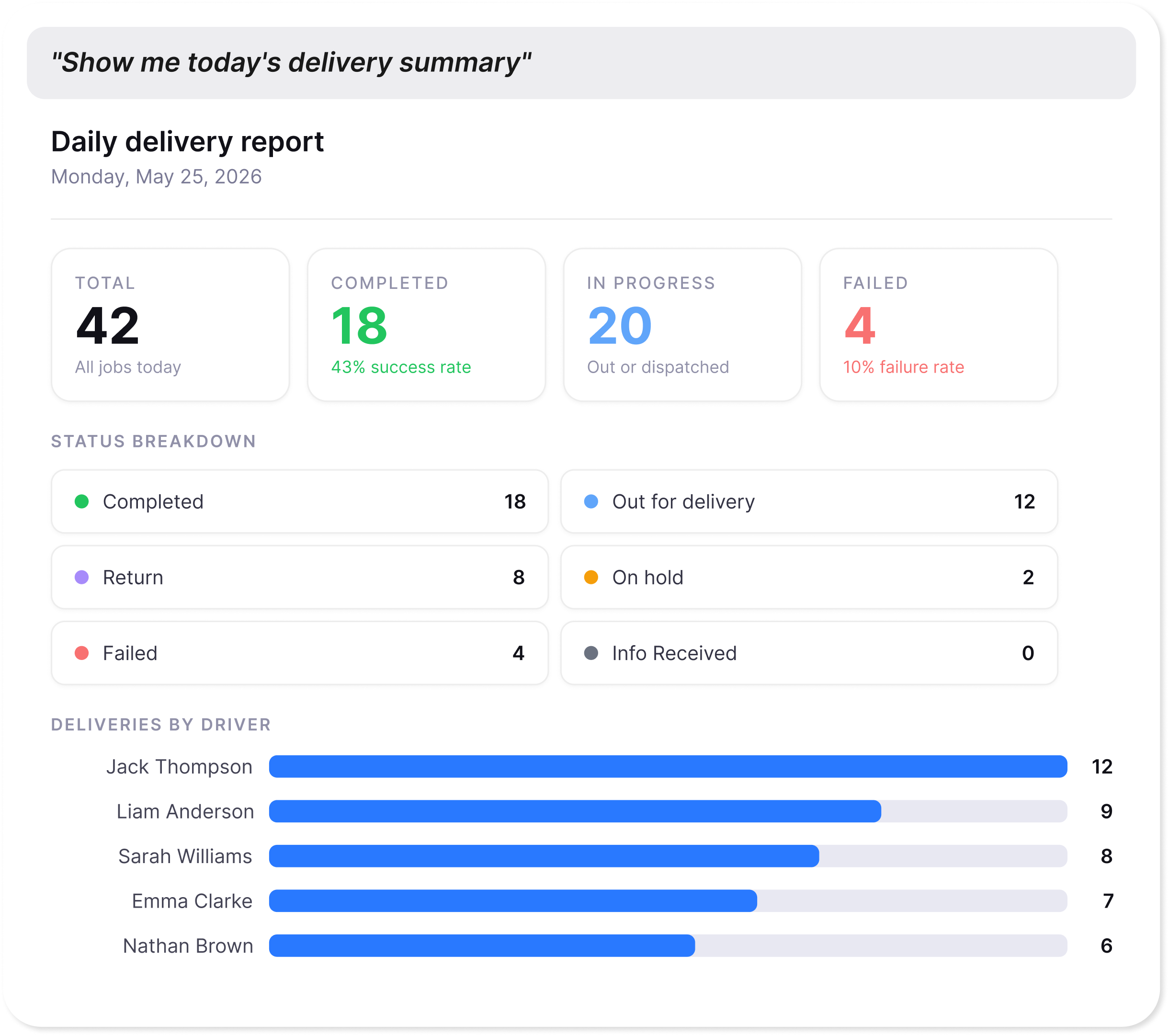
The Detrack MCP server connects your live Detrack data to the AI tools your team already uses. It works with Claude and Microsoft Copilot today, with more platforms on the way, and it's available to all Advanced plan customers. Your AI can then blend your Detrack data with other data sources, such as your CRM, accounts or inventory, to surface answers no single system can give you on its own.

It's been one of our most popular releases this year, and you can now increase your query limit to get even more out of it.

Increasing the Detrack MCP server query limit

With the Detrack MCP server, you can:

  • Ask plain-English questions about jobs, drivers and operations, with answers backed by live Detrack data
  • Cut a multi-minute lookup to seconds, whether you're checking a driver's status, a customer's delivery or an ops overview across branches
  • Keep answers scoped to your groups, zones and job types, within your own environment
  • Get the full picture by combining Detrack with your other systems, without exports, spreadsheets or opening the dashboard

💡 To get access, sign up for the Detrack MCP server beta. If you'd like to increase your query limit, contact us via live chat or at support@detrack.com.

Coming soon

What's coming up to help you move faster and smarter

As we head into October, the team aren't slowing down. Here's a first look at two of the biggest things we're working on, starting with a new driver app expected in Q4 2026.

A new driver app, built to move faster

We're launching an all-new Detrack driver app. It arrives as a separate app in the App Store and Google Play, rebuilt from the ground up so we can ship new driver features faster and more often, giving admins more control over how drivers work and keeping every delivery on track from the first check to the last stop.

Flexible POD rules launching first

Set minimum photo counts for proof of delivery, and let drivers scan QR codes straight from their photo gallery, so every POD meets your standards.

Following soon after

  • Driver chat, so drivers can message dispatchers and admins in the app and sort out delivery issues as they come up. No phone tag.
  • Map view, giving drivers a clear view of their route so they can move through their stops quickly and confidently
  • Clock in and out, capturing shift start and finish in the app drivers already use
  • Scheduled vehicle checks, set weekly or monthly, with drivers notified ahead of time to complete them
  • Customisable pre-delivery text, so you can personalise the message drivers send ahead of each delivery and recipients are ready when it arrives
  • Mandatory barcode scanning against every delivery item, so the right items are collected and delivered
  • Mandatory milestones, so drivers log every key milestone and you can analyse delivery performance across every touchpoint
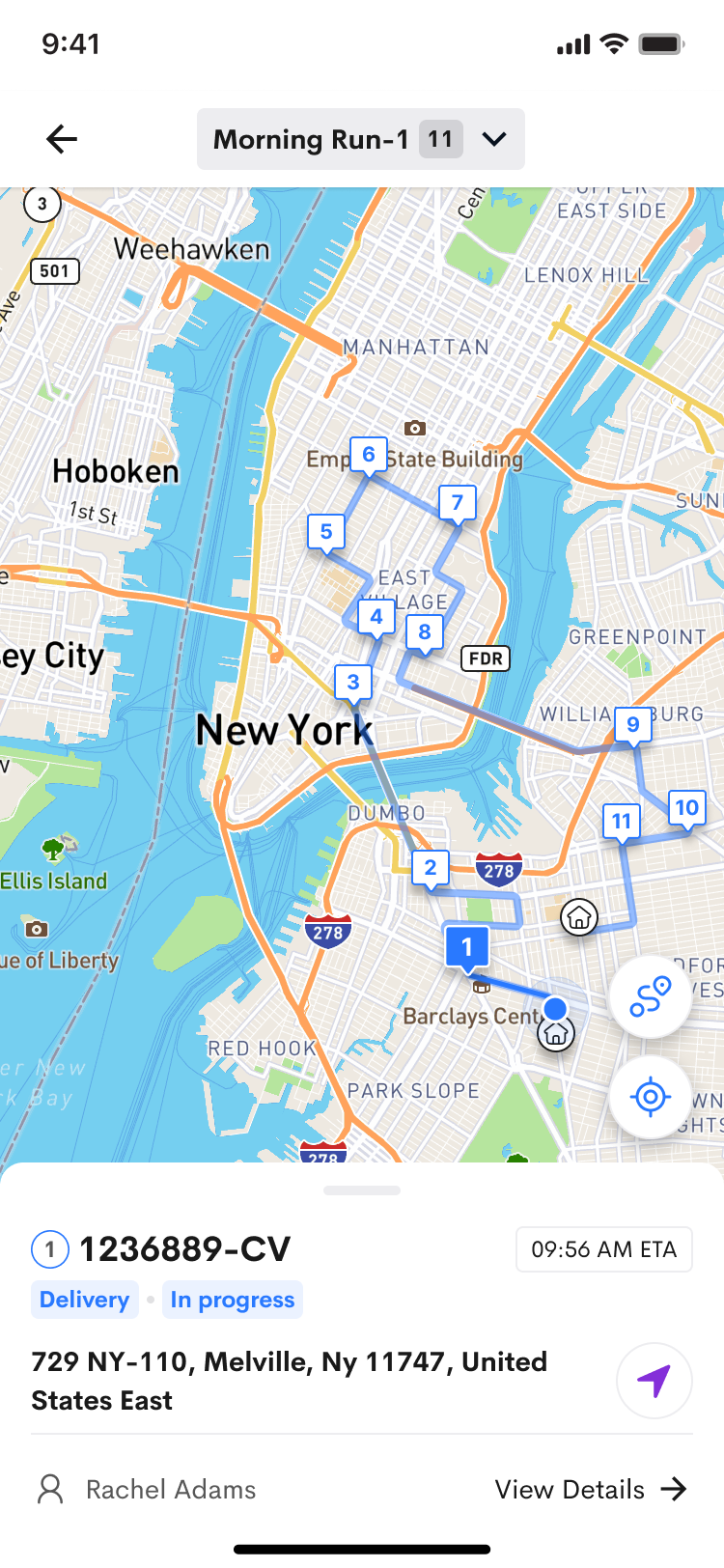
The new Detrack driver app showing a driver's run on the map view
Is your fleet ready? 10 yrs The age of some devices we still see in customer fleets
  • Older phones are losing support. Many are no longer supported by the app stores, and Apple has flagged iPhone 6 and 7 models as end of life in 2027.
  • Review your devices now. The new app needs a minimum spec to run, so checking early avoids disruption when you move across.
  • Our older app keeps running. But Apple and Android will stop pushing support and security updates to older phones.
Check device requirements
Roadmap · AI

AI that answers, then acts, then works for you

There's a lot of big talk about AI at the moment across every industry. For the most part, Detrack is doing what we've always done for customers: helping you work smarter, do more with less, and remove manual and repetitive tasks for dispatchers, managers and drivers.

That will continue to be our focus as we introduce native agentic features. We were the first amongst our peers to launch an MCP connector, and here's where our AI goes next.

  1. Here now

    Ask

    Instant answers from your data and our knowledge base

    • AI Assist, a knowledge base agent for quick support answers, 24/7
    • Wider MCP connectors with higher limits, so Detrack data works with the AI model you prefer

    Outcome Answers in seconds, from your data

  2. Coming Q4 2026

    Act

    Tell Detrack what to do, in plain English

    • Job actions via AI: update, reassign and action jobs just by asking
    • Plain-English questions about your operation, right inside the Detrack dashboard

    Outcome Fewer clicks for your dispatch team

  3. Coming Q4 2026

    Automate

    Native agents that take manual processes off your plate

    • Onboarding Agent sets Detrack up for you in minutes from a few plain-English questions
    • Exception Agent flags issues as they happen (like a partially delivered job or a failed inspection), and can auto-resolve them

    Outcome Manual processes, handled for you

  • Minutes, not hoursto spot and act on a problem
  • Fewer failed deliveriesand costly re-attempts
  • Happier customersissues handled before they call
  • You stay in controlapprove each action or automate

Try these updates today

Weekly calendar, email reporting, Xero invoicing and higher MCP limits are all live now. Log in to explore, or book a walkthrough with our support team to get set up.

Prefer to self-serve? Visit the help centre

Dispatched in 2026

Everything we've shipped this year

Most of these updates started as a conversation with a customer. Catch up on any issue you missed.

  1. 6 You are here: October 2026

    Plan the week, prove every email, invoice in Xero, and a first look at what's next

    • Weekly calendar view
    • Email delivery reporting
    • Detrack to Xero invoicing
    • Higher MCP query limits
  2. 5 23 July

    Get a clear line of sight with Schedule View

    • Schedule View
  3. 4 17 June

    See where the time goes with new milestone insights

    • Milestone Reports
  4. 3 27 May

    Early access to the Detrack MCP server, and more

    • Detrack MCP server
    • Customisable job statuses
    • Multi-branch visibility
  5. 2 1 April

    Optimise your fuel consumption with all-new fleet capacity & timeline tools

    • Fleet Capacity Utilisation Report
    • Jobs table capacity indicator
    • Timeline View
  6. 1 12 March

    Marketplace enhancements, faster job transfers, and more

    • Bulk marketplace publishing
    • Marketplace driver groups
    • Route-to-route job transfers
    • Bulk release times
    • Single-run QR codes