Summary
- Specialized construction logistics software offer features that match how your customers actually work: SMS notifications, live tracking, flexible routing, solid proof of delivery, and more.
- The right software helps you hit delivery windows, reduce failed deliveries, and give your customers the visibility they need
- Look for a platform that’s highly customisable and proven with suppliers like you, not one built solely for consumer delivery
Why generic delivery software falls short for construction
Most delivery management software is built for e-commerce, retail, or food delivery and often falls short for businesses that deliver for building and construction customers. These platforms assume:
- You’re delivering to fixed addresses with clear access
- Someone’s waiting at the door to receive
- Deliveries are quick drop-offs, not complex handovers
- A failed delivery means leaving a card and trying again tomorrow
Construction deliveries are different:
- Sites don’t always have verified addresses or accurate GPS locations
- There’s no reception desk or doorbell to ring
- Unloading can require forklifts, cranes, or significant time on site
- A failed delivery doesn’t just inconvenience your customer, it can stop an entire crew from working
- The person who ordered isn’t always the person receiving
- Schedules change constantly
Features that actually matter for construction deliveries
Suppliers need a construction logistics software designed for the realities of job sites. Here are the features that make a real difference.
Real-time visibility and schedule flexibility
Your customers shouldn’t have to call to find out where their order is. And when schedules change, whether that’s a delayed pour, weather shutting a site, or a last-minute reschedule, your software needs to handle it without creating chaos.
Look for:
- Real-time GPS tracking visible to customers
- Shareable tracking links (no app download required)
- Accurate ETAs that update as conditions change
- Easy rescheduling and reordering of jobs
- Real-time updates pushed to drivers
- Ability to add urgent jobs mid-route
- Clear visibility of what’s changed and what’s on track
SMS and WhatsApp notifications
This is the feature that makes the biggest difference. Your construction customers aren’t checking email during their working day. They’re on site, on scaffolding, operating equipment. SMS and WhatsApp reach them where they are. Look for:
- Automatic notifications at key stages (dispatch, en route, ETA, arrived, delivered)
- Customisable message templates you can tailor to your business and customers
- Ability to send to multiple recipients per delivery
- Live tracking links your customers can share with their team
Route optimisation
Hitting delivery windows matters more for construction than most other industries. Route planning and optimisation helps you plan efficient routes that get drivers to sites on time. Look for:
- Multi-stop route planning
- Ability to set delivery windows and priorities
- Real-time traffic consideration
- Easy re-routing when schedules change mid-day
- Capacity and vehicle constraints
Electronic proof of delivery
Disputes happen on construction sites. “We never received it.” “It was left in the wrong place.” “Half the order was missing.” Good proof of delivery protects you and gives your customers confidence. Look for:
- Photo capture (multiple photos per delivery)
- GPS location stamp
- Timestamp
- Digital signature capture
- Notes field for delivery instructions or issues
- Instant availability (not waiting for paperwork to be processed)
- Secure data storage and easy searchability
Vehicle checks
Construction and building suppliers often run fleets carrying heavy loads across rough terrain and busy roads. Keeping vehicles roadworthy isn’t just good practice; it’s a compliance requirement. Digital vehicle checks help you stay on top of this. Look for:
- Customisable daily check templates (tailored to your vehicle types)
- Driver sign-off before starting routes
- Photo capture for damage or defects
- Automatic alerts when issues are flagged
- Digital records for compliance and audits
Driver app that works in the field
Your drivers need something that’s easy to use on site, not a complicated system that slows them down. Look for:
- Simple, intuitive interface that drivers can adopt quickly
- Works offline or with poor signal (common on construction sites)
- Easy photo capture
- Clear navigation to site access points
- Quick POD completion
Customisation
Every supplier operates differently. Your workflows, notification preferences, POD requirements, and reporting needs are specific to your business. One-size-fits-all software forces you to adapt to it. The right platform adapts to you. Look for:
- Customisable workflows and fields
- Flexible notification templates and triggers
- Configurable POD requirements
- API access if you need to integrate with other systems
- Ability to set up different processes for different delivery types
- Reporting that gives you actionable insights to enhance your operation
Questions to ask before you choose
Does it handle SMS and WhatsApp notifications natively?
Some systems only offer email notifications or require third-party integrations for SMS. If SMS isn’t built in and easy to set up, you’ll either skip it or it’ll be a headache.
Can customers track deliveries without downloading an app?
Construction site managers aren’t going to download your app. They need a link they can open in their browser and share with whoever is onsite receiving.
How does it handle schedule changes?
Ask what happens when you need to reschedule a delivery mid-morning, or add an urgent job to a route that’s already in progress. If the answer involves a lot of manual steps, that’s a warning sign.
What does proof of delivery include?
Photos, GPS, timestamps, and signatures should all be standard. Ask how quickly POD is available after completion and how easy it is to retrieve if a customer has a query.
Does it include vehicle checks?
If you’re running a fleet, you need digital vehicle inspection records. Ask whether checks are customisable to your vehicle types and whether defect alerts are automatic.
Can you send notifications to multiple people?
If the system only allows one contact per delivery, you’ll struggle with the “no one was there” problem.
How customisable is it?
Ask how much you can tailor workflows, notifications, and POD requirements to your specific needs. If the answer is “not much”, you’ll be working around the software instead of with it.
Does the platform have open APIs for integration with other systems?
If you’re using accounting software, inventory management, CRM, or order management systems, you’ll want your delivery platform to connect with them. Look for out-of-the-box integrations, and open APIs that let you automate workflows, like pushing order data in or pulling delivery confirmations back, without manual data entry. Ask whether the API is well-documented, what support is available for integration setup, and whether there are existing integrations with systems you already use. A platform without API access can become a data silo that creates more admin work, not less.
Do they have customers like you?
Ask for case studies or references from other construction suppliers that are similar to yours. A platform that works well for e-commerce might not understand your challenges.
What does onboarding and support look like?
Construction suppliers often have drivers who aren’t tech-savvy. Ask about training, support availability, and how long it typically takes to get up and running.
What’s the pricing model?
Some systems charge per driver, some per delivery, some flat monthly fees. Understand what you’re paying for and how costs scale as your business grows.
What to avoid

Systems built only for consumer delivery
If the case studies are all about pizza delivery or e-commerce parcels, it’s probably not designed for the complexity of construction.
Overly complex platforms
If it takes weeks to set up and your drivers need extensive training, adoption will suffer. Look for something that’s powerful but simple to use.
No mobile offline capability
Construction sites often have poor signal. If the driver app needs constant connectivity, you’ll have problems.
Email-only notifications
If SMS costs extra or requires a separate integration, it’s not built for construction.
Limited POD options
If you can’t capture photos or the system only allows one photo per delivery, you’re not getting the proof you need.
Rigid, one-size-fits-all systems
If you can’t customise workflows, notifications, or fields to match how you operate, you’ll spend more time working around the software than benefiting from it.
How to evaluate
Make sure the platform can handle your everyday realities:
- Run a trial with real deliveries to real construction sites
- Get your drivers’ feedback on the app
- Test the customer notification experience (send yourself the SMS, click the tracking link)
- Try rescheduling a job mid-route and see how smooth it is
- Set up a vehicle check and see how easy it is for drivers to complete
- Check how quickly you can pull up proof of delivery after a job is completed
- Contact support with a question and see how responsive they are
The bottom line
Construction deliveries have unique requirements that generic software doesn’t address the features that matter most: SMS/WhatsApp notifications, live tracking, route optimisation, strong proof of delivery, vehicle checks, multi-recipient support, and flexibility when things change
Look for a platform that’s highly customisable and has a track record with building and construction suppliers, and similar businesses
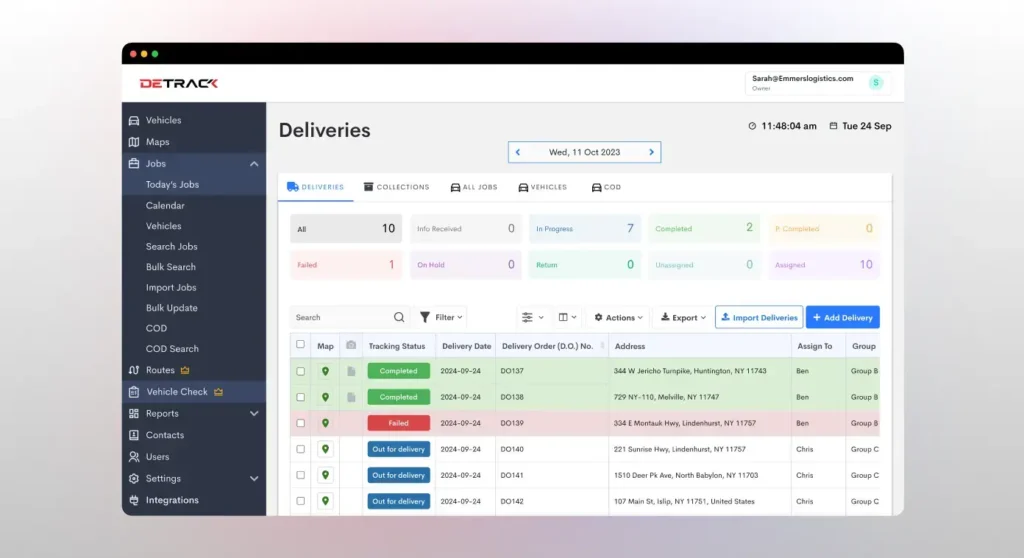
Detrack works well across many industries because it’s highly customisable to fit how our customers (and their customers) operate. We work with roofing suppliers, timber suppliers, concrete companies, tool hire businesses, and many more. Features include SMS and WhatsApp notifications, live tracking without app downloads, route optimisation, electronic POD with photos and GPS, digital vehicle checks, and the flexibility to set things up the way you need them.